

An Architecture Overview (AO) document is an ever-evolving document serving as a high-level guide to the key elements, structure, and reasoning behind a system’s architecture. Its primary goal is to provide stakeholders — including developers, product managers, and non-technical team members — with a clear understanding of the system’s architectural design and the rationale behind critical decisions that have been made along the way.
While individual developers might dig into specific components or technical implementation details, the AO paints a big-picture view, ensuring that everyone involved is aligned with the system’s overall architectural principles, characteristics, structure, and purpose.
What are the key objectives of this document?
Provide a high-level description of the system architecture
At its core, an AO describes the system’s key components, their interactions, and the overall design approach. It offers a visual and conceptual understanding of how the system is structured.
Communicate architectural principles, characteristics, and goals
Every system is built with certain principles, goals, and constraints in mind. The AO outlines these guiding principles, ensuring everyone understands the “why” behind the architectural choices.
Ensure alignment across teams
By offering a single source of truth, the AO guarantees that teams across the organization (e.g., development, operations, product management) have a shared understanding of the architecture. This prevents miscommunication and misalignment as the system evolves.
Document historical decisions and their impact
Systems don’t evolve in a vacuum. As systems grow, they encounter various technical challenges, shifting business requirements, or new external constraints. The AO provides a place to reference past decisions that have influenced the current architecture, often linking to Architecture Decision Records (ADRs).
Serve as a foundation for future evolution
While the architecture overview represents the system’s state at a point in time, it also sets the stage for future development. The AO helps new team members onboard and guides future architectural decisions by offering insight into the system’s current state.
What should an Architecture Overview document include?
Depending on the business domain or system, the owner of the document can add more relevant sections to the document. I will focus, though, on the ones I find more critical to the goal of the document.
1. Business context
This initial section provides a summary of the “why” behind the system, explaining the core business problem the system is solving. External resources like formal business requirements or research documents, domain storytelling, or event storming workshop assets should also be included in this section, in case the reader wants to know more about the topic.
One key thing to also do is to define the key terms and concepts that will be used consistently throughout the document. By establishing a shared vocabulary (also known as the ubiquitous language of the domain), this section ensures both technical and non-technical stakeholders fully understand what is being discussed, facilitating clarity across the rest of the document.
2. Quality attributes
Quality attributes (or architectural characteristics) should be documented to ensure the architecture directly addresses the most critical aspects of the business domain. These attributes — such as scalability, security, performance, or availability — are essential to the architecture’s success and reflect the domain’s specific demands. For instance, in a hospitality management platform, ensuring high availability during peak booking seasons or maintaining strict security standards for guest information would be key architectural goals.
By emphasizing these quality attributes early in the document, teams can clearly see the non-functional requirements that must be met to support the domain effectively. This guarantees that design decisions, trade-offs, and future developments remain aligned with the business’s core needs, guiding the technical architecture to fulfill not just functional requirements but also the strategic objectives of the domain.
3. Assumptions and constraints
This section should contain any constraints faced by teams in design and implementation choices or related processes, as well as any assumptions that guide these decisions or overall strategy. Constraints can sometimes go beyond individual domains and might be valid for whole organizations and companies (e.g., company-wide technology choices or government regulations).
4. System view (or high-level view)
A system view is particularly useful for representing the current system by clearly showing its boundaries and the external components that interact with it. It highlights how the system fits within its environment, depicting and describing users, external systems, and data sources that communicate with or depend on it. This high-level view helps stakeholders quickly grasp the key interactions and dependencies without examining internal complexities. By focusing on external relationships, the section aids in understanding the system’s role, its touchpoints, and how changes in external components might impact the system.
There are many ways to draw such a diagram, but consistency throughout the organization is key. A good recommendation of a simple, yet powerful way to draw these diagrams with a high level of clarity is the C4 model’s system context diagram.
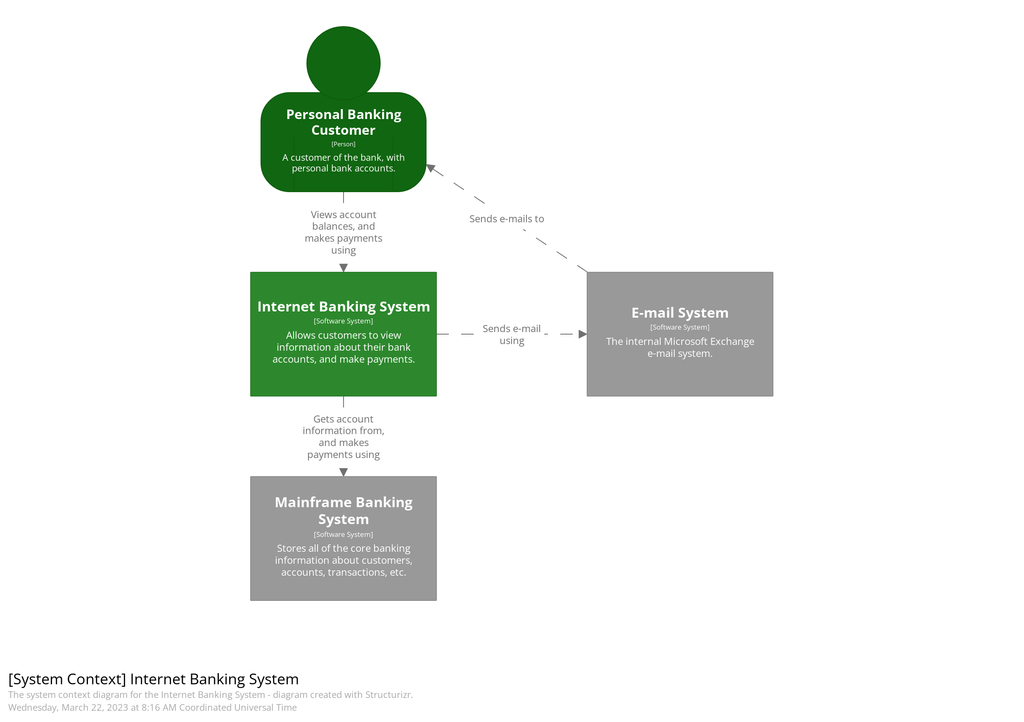
Always make sure that any reference to an external system links back to its own AO (if available) as this helps the reader jump to the appropriate resource for more context. If this is not possible in Confluence (external diagram for example), then add a list of external systems bellow the diagram instead.
5. Container view
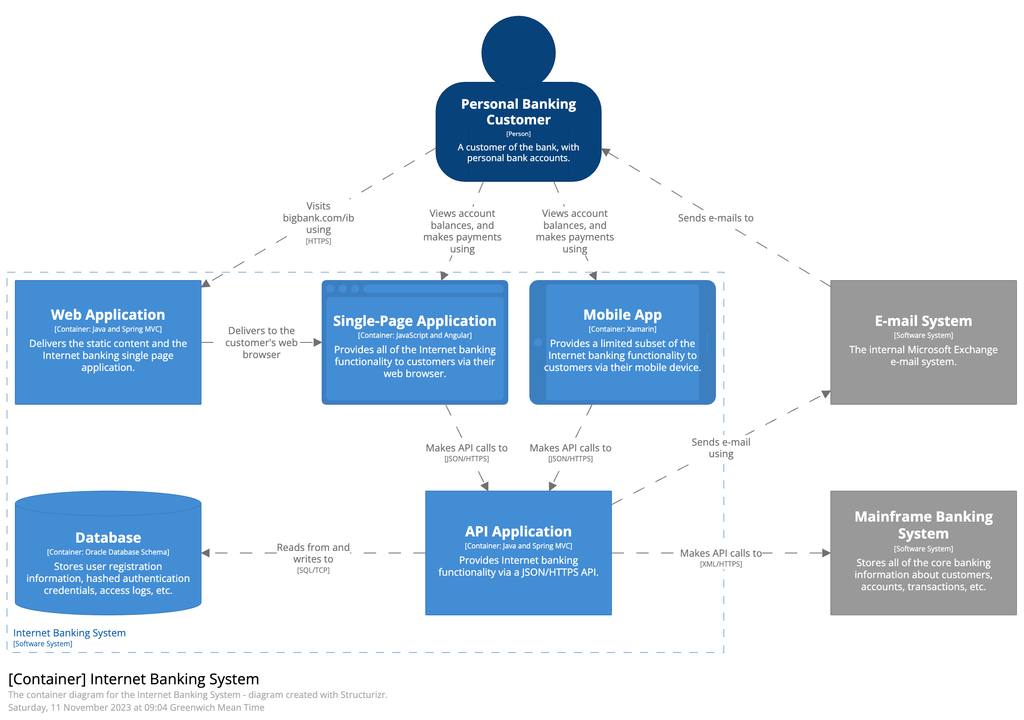
This section builds on the insights provided by the system view by offering a more detailed view of the internal structure of the system. While the system context view identifies external interactions and boundaries, a container view breaks down the system into its major components or “containers,” such as web applications, databases, and microservices, describing how these elements communicate and collaborate within the system. This level of detail helps stakeholders understand the architecture, technologies, and responsibilities of each container, making it easier to identify areas for improvement, scalability, and performance. Additionally, by clarifying the relationships and data flows between containers, the diagram supports discussions around design choices, deployment strategies, and integration with external systems, promoting a deeper understanding of the system’s functionality and operational considerations.
6. Deployment view (or physical view)
Adding a deployment view to an AO that already includes a system view and container view enhances clarity by providing a tangible representation of how components are deployed and configured within the infrastructure. While the system and container views outline the logical structure and interactions of the system, the deployment view details the actual environment in which these components operate, including underlying technologies or services, servers, network configurations, and deployment locations.
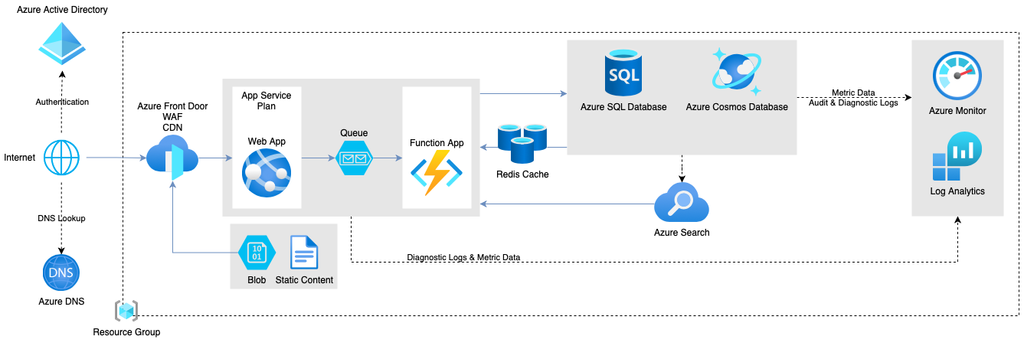

This visibility is essential for the engineering team that owns the system, ensuring teams fully understand the deployment context of their containers. Knowledge of how components are configured and interconnected within the overall ecosystem empowers teams to effectively manage performance, troubleshoot issues, and implement changes, ultimately leading to greater accountability and operational efficiency. By integrating this diagram into this document, teams can bridge the gap between design and implementation, fostering a holistic understanding of the system’s architecture.
7. Operational view
This section should outline how the application will be managed once deployed in production, covering operational aspects critical for maintaining the system attributes defined in the document (reliability or scalability, for example).
It usually contains relevant topics like (but not limited to):
- Observability strategy: Describe the monitoring tools, logging strategy, key metrics, and alerts (including alert thresholds for alerts and escalation procedures) that will be used to track application performance and health.
- Incident management: Outline the steps for managing incidents, including detection, reporting, and resolution.
- Deployment strategy: Outline the process for deploying updates, including CI/CD pipelines and automated testing. Outline the steps to revert to a previous version in case of deployment issues.
- Capacity management: Describe how the system will scale to accommodate changing loads (e.g., vertical vs. horizontal scaling) and explain how resources will be allocated and managed in production.
- Backup and recovery: Outline the approach for regular data backups and storage solutions and describe the recovery processes in the event of major outages or data loss.
8. Decision log
Maintaining a list of historical architecture or implementation decisions alongside its current form is crucial for maintaining historical context and understanding the rationale behind the evolution of the system. As systems grow and adapt to changing business needs, user requirements, and technological advancements, the decisions made at various stages provide insights into the trade-offs and priorities that shape the current architecture and implementation. This historical record helps teams recognize patterns, avoid repeating mistakes, and build upon previous learnings, creating a culture of informed decision-making.
Moreover, surfacing past decisions in an architecture overview facilitates better onboarding for new team members and stakeholders, allowing them to quickly grasp the reasoning behind what exists today. It also serves as a reference point for discussions about future changes or enhancements, ensuring modifications are aligned with the overarching goals and constraints that were initially established. By keeping track of these decisions, teams can maintain continuity, improve collaboration, and drive more strategic planning in the ongoing development and maintenance of the system.
Does this mean that you need to edit the document and add a new entry every time you make a new decision? No.
First of all you should use Architecture Decision Records (ADRs) to record decisions. ADRs are small, focused documents that record important decisions (like choosing a microservices architecture over a monolithic one or selecting a particular cloud provider) made at specific points in a domain/system’s evolution. Since the ADRs refer to this domain/system, then they should logically be child pages of the architecture overview document.
9. External references
This final section provides links to external documents, resources, or tools that offer additional context or information relevant to the architecture. These act as a frame of reference, helping stakeholders gain a deeper understanding of the business domain, decisions, strategies, and technologies outlined in the document.
Grouping multiple systems together
Tying all AOs owned by a team to their respective domains within an architecture index is crucial for maintaining clarity and organization across complex systems. Teams often manage multiple domains, each with its own architecture and business goals. An architecture index acts as a centralized reference point that organizes these AOs, making it easy to discover, access, and understand the different domains and their interrelationships. This approach ensures consistency, reduces duplication, and fosters cross-team collaboration by providing a clear overview of the systems a team is responsible for.

Can you document as effectively as José does?
Let’s talk!
Having an architecture index also supports better decision-making because stakeholders can quickly understand the full scope of a team’s contributions. As systems evolve, knowing how each domain ties into the broader architecture is critical to ensuring that decisions in one area don’t have unintended consequences in others. It also helps new team members or external collaborators get up to speed by offering an organized view of all the domains a team manages.
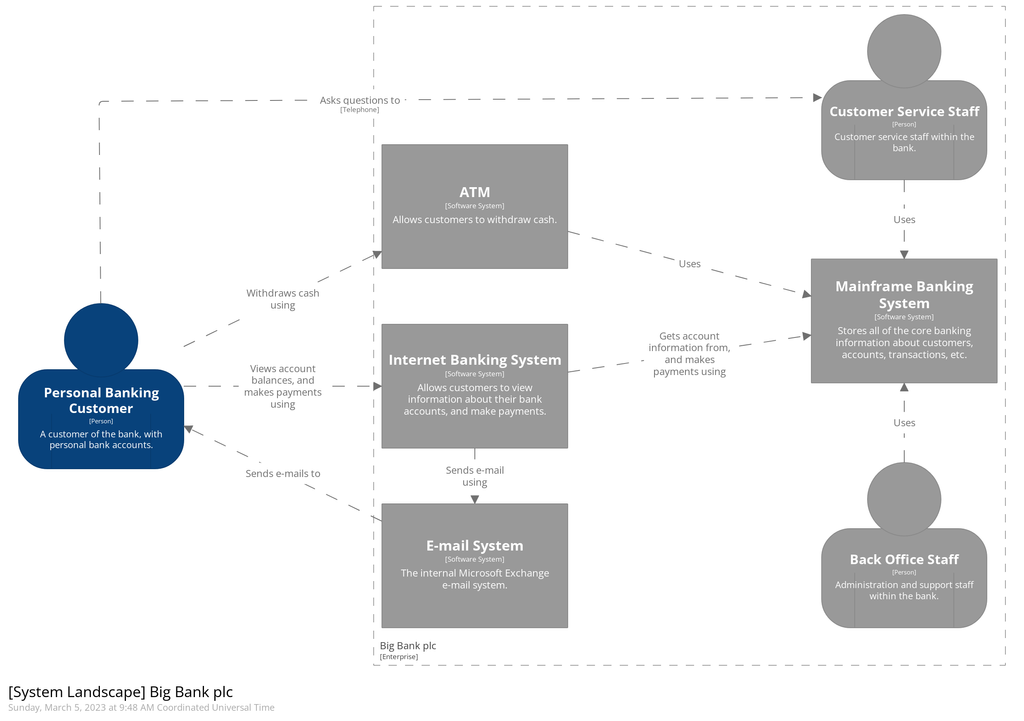
A simple way of doing this is to host AOs under a main architecture page (a simple report on child AOs) with a system landscape diagram to visually represent the underlying systems and how they interact.
├─ Confluence space X
│  ├─ Architecture index with a system landscape diagram
│  │ ├─ Domain A / Architecture Overview
│  │ │ ├─ ADRs + RFCs + ...
│  │ │ └─ ...
│  │ ├─ Domain B (Architecture Overview)
│  │ │ ├─ ADRs + RFCs + ...
│  │ │ └─ ...
│  │ └─ ...
│  └─ ...
├─ Confluence space Y
│  └─ Architecture index with a system landscape diagram
│    └─ Domain C / Architecture Overview
│      ├─ ADRs + RFCs + ...
│      └─ ...
└─ ...
System landscape diagram
A system landscape diagram is a high-level visual representation that shows the various systems, domains, and services a team manages and how they interact within the larger ecosystem. Adding a system landscape diagram to the top of the architecture index provides an immediate visual context of how the team’s systems and domains fit into the overall architecture. This helps stakeholders, developers, and other teams see the big picture, including dependencies, external integrations, and the role each system plays.
Conclusion
An Architecture Overview document is not just a technical document; it’s a bridge that aligns the business and technical goals of a project. By offering a high-level understanding of the system’s structure, its principles, and the reasoning behind key decisions (referencing detailed ADRs), the AO becomes an indispensable tool for disseminating context across the organization.
This document should be concise and practical, focusing on providing essential context that emphasizes what matters for fulfilling business needs. By prioritizing clear communication and relevant information, the owning team can enhance collaboration and decision-making without burdening stakeholders with excessive details.
Whether onboarding new team members or planning future architectural changes, the AO ensures everyone has a shared understanding of where the system stands today, how it got there, and potentially, where it might go next.
This blog post is part of a series of articles dedicated to lean documentation practices: