

Another day, another attack. It seems hackers just can’t stop hacking for a hot minute. You turn on the news and here it is; another breach, panic. What happened? Are you in danger? What should you do? But most of all, how does no one catch them? How hard can it be to find a guy in front of a computer, with a hoodie?
Turns out, not all hackers are the same, and not all of them wear hoodies. This post will try to give you an idea of what motivates them, how they work, and what you can do to protect yourself.
What is a hacker?
The term “hacker” originates from the verb “to hack,” meaning to “cut with heavy blows in an irregular or random fashion.” But in the ‘50s and ‘60s at MIT, computer science students were using it as slang to describe a shortcut.
In those years, computers were expensive to run, and programming shortcuts saved time and money. Creating them became a badge of pride, and students actively participating in the discovery of new ones called themselves “hackers.”
For these students, whether a particular hack would be authorised by the school was not a barrier. That’s how the first recorded use of the word “hacker” ended up being in a 1963 article detailing how hackers managed to illegally access the university telephone network.
A Hacker’s Hat
Not all hackers are evil. They have different motives; some of them are enthusiasts trying to innovate, while others are security breachers trying to find weaknesses in systems and exploit them. They are typically categorised by metaphorical “hats” (although the industry is shifting toward more inclusive terms).
| Hat | Motivation | Note |
|---|---|---|
| Black Hat | Financial gain, sabotage, espionage | What most people associate with the word “hacker;” someone who acts with malicious intent. |
| Grey Hat | Mixed motives (popularity/profit) | Finds vulnerabilities and discloses them to help companies or the community, or to get a financial reward. |
| White Hat | Improving security | Hired by companies to identify vulnerabilities in their systems and report their findings. |
Types of hackers
Let’s dive a bit deeper into some of the most common categories that malicious hackers fall into.
Script kiddies
Inexperienced hackers who use tools created by others, often not fully understanding what they do or how to use them.
A notable script kiddie attack happened in 2015, when a 17-year-old used readily available software to scan websites for security vulnerabilities to impress their friends.
A vulnerability was found on the TalkTalk (British telecommunications company) website and posted online for others to use. This led to 15,000 people having their details stolen alongside severe financial and reputational damage for the company.
Script kiddies’ main motivations are usually simple: seeking attention, creating chaos, and having fun.
Hacktivists
These hackers work in defence/support of an ideal or a political current.
One of the most famous groups of Hacktivists, “Anonymous,” most recently launched a campaign against the rise of fascism, targeting notable individuals (see the call to action here), and another in defence of Ukraine.
Their main motivations are political and idealistic.
State-sponsored hackers
Carrying out cyber-attacks on behalf of a government or nation-state, these hackers may be part of state agencies or the military.
Their work can vary from carrying out espionage to testing the offensive/defensive capabilities of an adversary, spreading misinformation, and more.
A notable example is the 2016 hack of the Democratic National Committee in the United States, which was attributed to attackers sponsored by the Russian government. This led to the leak of sensitive information aimed at disrupting the ongoing election.
In this case, motivation varies based on the sponsoring state’s ultimate goal: espionage, disruption, economic advantage, political influence, etc.
Lone wolves
Lone wolves are very skilled and self-reliant.
They act on their own, and their motivation differs. They could be hacking for personal or ideological reasons, financial gain, or simply out of curiosity and the thrill of it.
One of the most well-known lone wolf attacks is the Morris Worm, the first major cyber-attack in history developed by Robert Tappan Morris to gauge the size of the internet by “crawling” through connected computers.
The independent nature of a lone wolf means their motivation could be either ethical or malicious.
Organised cybercrime groups
Organised cybercrime groups are structured networks of individuals collaborating to carry out illegal activities through hacking.
They often have hierarchical structures with developers, recruiters, and sometimes even HR!
One of the most well-known organisations, “Evil Corp,” is responsible for several attacks, including one that took Garmin services offline in 2020. Their services include the development of malware and cybercrime-as-a-service, offering their tools and expertise for a fee.
Their motivations are mainly financial gain.
The Cyber Kill Chain
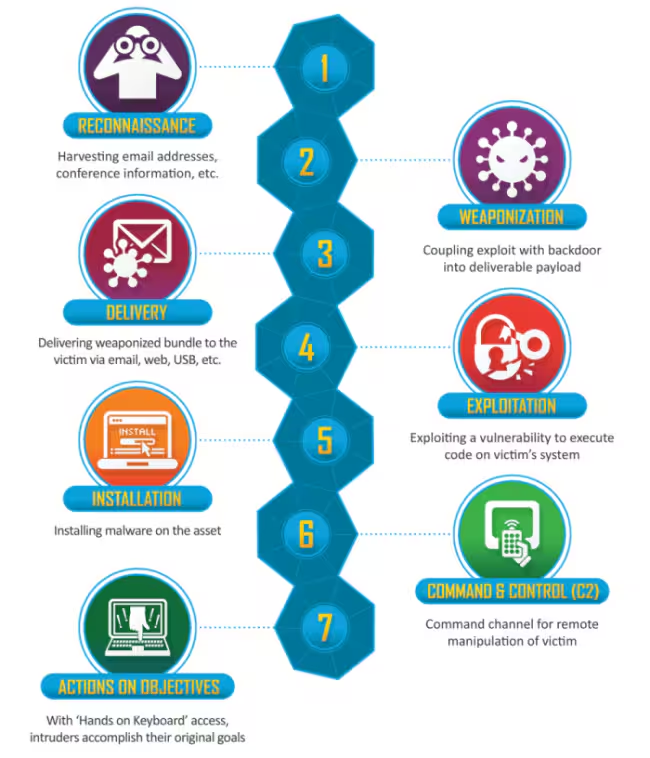
Now that we know a bit more about who the typical hacker is, let’s explore how they usually work. Cyber-attacks can be better understood with the help of the “Cyber Kill Chain,” a model derived from military concepts that breaks down an attack into seven distinct phases.
- Reconnaissance
- An attacker gathers as much information as possible about their target. They could do so by looking at publicly available information or using more sophisticated techniques.
- An attacker gathers as much information as possible about their target. They could do so by looking at publicly available information or using more sophisticated techniques.
- Weaponisation
- Using the information collected, the attacker plans their next moves and prepares the most suitable resources (“weapons”) for the attack, such as malware or phishing email content.
- Using the information collected, the attacker plans their next moves and prepares the most suitable resources (“weapons”) for the attack, such as malware or phishing email content.
- Delivery
- Once the “weapons” are ready, they are “delivered” to the target. This could be accomplished through various means, like an email impersonating a tour organiser from your recent social media post, asking you to click a link to sign urgent documents for the trip.
- Once the “weapons” are ready, they are “delivered” to the target. This could be accomplished through various means, like an email impersonating a tour organiser from your recent social media post, asking you to click a link to sign urgent documents for the trip.
- Exploitation
- If the delivery is successful, the attacker uses the delivered “weapons” to bypass security measures and gain unauthorised access to the target’s resources.
- If the delivery is successful, the attacker uses the delivered “weapons” to bypass security measures and gain unauthorised access to the target’s resources.
- Installation
- Once inside, the attacker needs a way to maintain access to the target. They could do so by installing malware or even just by changing the target’s password.
- Once inside, the attacker needs a way to maintain access to the target. They could do so by installing malware or even just by changing the target’s password.
- Command and control
- A communication channel with the breached system is established, allowing the attacker to send commands and control it.
- A communication channel with the breached system is established, allowing the attacker to send commands and control it.
- Actions on objectives
- The breached target is now exploited, and the attacker can finally achieve their objective: stealing sensitive information, creating chaos, or other goals.
What can I do to protect myself?
At this point, you should have a better idea of who a hacker is, their intentions, and their typical modus operandi. This knowledge gives you a great advantage, as it empowers you to recognise who is more likely to target you and how they might do so.

Do you know your enemy?
Join us and help build a safer digital world—check out our open positions!
To best protect yourself, you may want to draft a security plan, assessing your personal assets, identifying who is more likely to target them, performing a risk analysis, and deciding on a series of actions to take. This is something that could be addressed in a future post.
For now, here are some recommendations to help you achieve a generally good level of protection:
Don’t over-share
Everything you share can be weaponised, especially when it comes to spear phishing (a phishing attack targeted at a specific individual).
A security professional once told me a great example about a small business owner who posted on social media about securing a big investment right before going on holiday.
An attacker saw an opportunity and, a few days later, contacted the firm pretending to be the owner. They claimed to have found a company they urgently needed to invest in. Coming back from vacation couldn’t have been worse…
Be careful with emails and “hacked” freebies from the internet
When receiving an email with a link, always think thrice before clicking. Verify the email address, does it look suspicious? Is the email about something that you need to do urgently? Does it have grammar/spelling mistakes? Is Taylor Swift suddenly messaging you because she needs you to pay for her taxi? You’re probably being phished.
At the same time, always be careful before installing a hacked version of your favourite software or pirating a movie. The person behind it might be acting out of goodwill (hacktivism), or there could be something malicious hiding inside.
Keep your software up to date
Many attacks take advantage of security vulnerabilities that have already been discovered and disclosed.
These vulnerabilities are usually unintended behaviours coded into software products. The company behind the product will most likely respond by fixing them promptly (at least the most severe ones) and deliver the fix through an update.
This is why keeping software up to date is so important. It’s not just about shiny new features but also about making yourself harder to target.
Back up your data
Having a backup makes it easier for you to recover anything you value if your device suddenly breaks down or gets stolen. It also protects you from a ransomware attack (a hacker encrypting the content of your device and asking you to pay a ransom to decrypt it).
Use strong authentication
If an attacker successfully manages to steal or guess your credentials, two-factor authentication makes it much harder for them to access your information.
Another good practice is using a password manager: a unique password per service and no need to remember them all?! Sign me up!
If you want to know more about this, checkout my previous post about authentication.
Conclusion
The cyber world can be pretty scary when you’re constantly hearing about hacks, breaches, and weird tech terms. But once you understand what’s really going on, it’s not as terrifying as it sounds.
Hopefully, this post will help you feel a bit more comfortable navigating the digital landscape. Maybe you’ve even picked up a few tips to boost your own security. Remember, knowledge is power!
So, keep learning, stay curious, and don’t let cyber fears hold you back!