

Modern authentication challenges
Extensive communication is a nearly universal trait of modern systems. Services talk to each other, their databases, and other resources providing critical functions. Supporting tools (such as Infrastructure as Code pipelines), need to reconfigure the environment. Protocols and request volumes may vary, but the identity of each participant is never certain. How do we authenticate all this communication?
There have been countless examples of leaked persistent tokens causing major issues. Dropbox had an unpleasant incident in April 2024. The attackers are believed to have gained access to a Dropbox Sign automated system configuration tool and compromised a service account that was part of the service’s backend. Exploiting the account’s elevated privileges, they accessed the customer database.
How do we avoid the risks and consequences of secrets leaking? Could we live without any persistent secrets being leaked? This article explores how managed identities help us achieve that.
Why long-lived secrets are a security risk
If you have configured any application in a production environment, you will be familiar with this challenge. The application needs to be given secrets such as:
- Service account credentials to access databases
- API keys to integrate with external services
- Certificates to initiate mutual TLS connections
- And many others…
To complicate matters further, the tools surrounding the application also need to communicate with each other. Many external tools provide only API keys in the form of personal access tokens (PATs) to authenticate any communication with them.
All these values need to be stored somewhere. Do you know exactly who can access them at any given time? Of course, you might say—your permissions are in order and well audited… right? If the secrets expire, who will rotate them before that time? And how? In the case of PATs, do you know who has that token on their account? Or was it on some shared account in this tool?
The lack of good answers to these questions pushes engineers in two main directions:
- Make secrets long-lived and rotate them rarely. This lowers the operational load. It also increases risks. If the token leaks, it can still be valid and abused for a long time. If it doesn’t, it will eventually expire. Processes often fail when they are not practiced regularly, and we may rediscover that at this moment.
- Automate the process and shorten the expiration period. This approach is becoming more and more common. For example, certificate authorities are pushing for shorter and shorter validity periods for public certificates. However, this solution requires investment in extra tooling and effort to implement and maintain.
Ultimately, even secrets with shorter timespans (like certificates that expire in 90 days) can still leak and be abused for a painful amount of time. This means that the fundamental problem remains. We have to store secrets securely and manage access to them carefully, regardless of their expiration period.
Is there a more secure alternative to secrets?
As a great engineer once said, it depends. If we are hosting our own applications, then we may not have a choice. These secrets will exist and therefore need to be protected. There are excellent technologies (like Hardware Security Modules) and widely used products (HashiCorp Vault, arguably the best-known example), which allow us to secure and maintain different types of secrets with high security standards. Inevitably, all of them require explicit effort and investment.
But what if we’re not hosting our own applications? What if we’re using higher-level cloud services? In this case, we might be able to delegate the problem of proving our application’s identity to the cloud provider. After all, the provider already knows which applications are running in their environment. Could we use this to avoid secrets? Could they vouch for our application’s identity instead?
Let’s explore Azure’s managed identities and then look at how we can leverage them.
Introducing managed identities
What is an Azure managed identity (MI)?
At its core, it’s simply a newer type of identity in Microsoft Entra ID (formerly Azure AD). As an Entra object, it is very similar to traditional service principles that applications in Microsoft’s ecosystem have used for years. A service principal (SP) gives us a client ID and client secret that we can use to configure our application. It can be assigned roles and used to generate tokens; all the standard features you’d expect for any machine identity. Managed identities have these capabilities too, but with one crucial difference: they don’t have any client secret associated.
How is this possible? The key is that managed identities can only be used if one of these conditions is met:
- The application runs in an Azure environment that supports managed identities
- OIDC identity federation with Microsoft Entra ID is available
Understanding MIs in Azure
There are two types of MIs:
- System-assigned identity: This identity is automatically managed by Azure and tied to a specific resource when enabled in its properties.
- User-assigned identity: This MI is created as an independent Azure resource, which can then be associated with multiple other resources. This gives us much more flexibility in how to use it. It can also persist when the associated resource is recreated. One thing to consider is that the application needs to request its usage explicitly (by its client ID), because there can be more than one user-assigned MI associated with the same hosted environment.
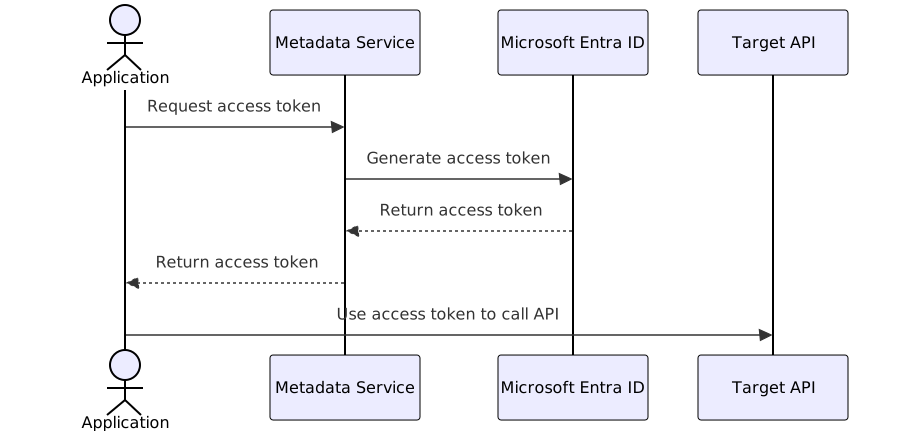
A managed identity can only be used in an Azure-hosted environment that has the Metadata Service available. This service exposes a special API, which is only accessible from inside the environment. When our application wants to assume the associated MI and use it to make an authenticated call, it first requests a token from the metadata service. The service verifies the application’s identity based on where the request is coming from and returns a standard OAuth2 access token.
At this point, it is in the same position as any other application that used an OAuth flow to have an access token issued. It can call any API that accepts these tokens. The server hosting the API can validate the token and if it trusts the same Entra ID tenant, it can use values from the token or look up more information in Entra ID based on the client ID of the MI. This means MIs are primarily valuable for API clients.
MIs also have one extra advantage over service principals. They are created as Azure objects and transparently mirrored into the Entra ID tenant. Because of that, only Azure RBAC roles are needed to manage them and to assign other RBAC roles to them. The assignment of Entra roles understandably still requires Entra permissions. This helps to separate the management of the Entra ID Tenant from the management of the MIs and their associated resources.
The only disadvantage we have found is in scenarios where both the client and server are applications, not Azure services. In this situation, there is a predefined cache expiration time for tokens in the metadata service, which cannot be changed. That means changes in permissions for the server might not propagate into the issued tokens for several hours, making usability in this scenario more limited.
When working with identities in Entra ID, it is useful to keep in mind that they have two identifiers: Client ID and Object ID. The Azure portal usually shows both, but only one is typically needed in any type of API interaction. It is therefore important to look carefully at which one is required.
Using MIs with GitHub actions
What if we aren’t running our application in any Azure managed environment? This is where another powerful feature comes in. Managed identities can be configured to support “federated credentials”.
Federation is an OIDC feature that enables a two-step authentication process:
- An application first proves its identity with one identity provider (in our case, GitHub’s OIDC provider)
- It can present this proof (an OIDC token) to a second provider (Microsoft Entra ID to get access to Azure resources). If the second provider is configured to trust the first, it will generate an OAuth access token for the application.
This allows our GitHub Actions to assume the identity of a preconfigured managed identity in Azure and access Azure APIs—perfect for enabling our Infrastructure-as-Code tooling to make changes in Azure. And it does so without storing any secrets in GitHub.


Want to see how Azure managed identities boost password-less authentication and security?
Check out our open positions!
Securing MIs with granular permissions
This sounds quite simple, but how do we know that only the right GitHub Actions can assume our identity?
When a GitHub Action requests a token from GitHub’s OIDC provider, the provider includes detailed information about the action in the token. This includes which repository it’s running in, whether it was triggered by a pull request or a push to a specific branch, and more. This is similar to how an application in Azure gets a token from its metadata service. The identity provider knows who requested the token and makes sure the values inside the token reflect it.
The information in the token allows us to create a “federated credentials” configuration linked to the MI in Azure. Entra ID will only accept and exchange tokens that match the expected value of a “subject identifier.” The federated credentials configuration needs to be created for each repository and for different types of triggers, because actions triggered by pull requests have different subject identifiers in their OIDC tokens than actions triggered by branch pushes. The identifier uses the following patterns:
- repo:<organization>/<repository>:pull_request
- repo:<organization>/<repository>:ref:refs/heads/main
Thanks to this, we have granular control over which GitHub action can access Azure API, with configuration and validation happening on the Azure side. However, this also means that in environments with multiple repositories and actions, we need to create quite a lot of configuration objects.
Setting up MIs with GitHub actions
To use managed identities with GitHub Actions, we need to configure both the workflow permissions and the necessary Azure subscription and identity details. Here’s a simplified example:
name: change-deployment
on:
  push:
    branches:
      - main

permissions:
  id-token: write # This is required for requesting the JWT from Github OIDC identity provider
  contents: read  # This is required for repository checkout

jobs:
  up:
    name: <job-name>
    runs-on: ubuntu-latest
    steps:
      - name: Deploy
        uses: <action-name>
        env:
          ARM_CLIENT_ID: ${{ vars.AZURE_IDENTITY_ID }} # MI's client ID
          ARM_USE_OIDC: true # Enable OIDC authentication
          ARM_TENANT_ID: ${{ vars.AZURE_TENANT_ID }}
          ARM_SUBSCRIPTION_ID: ${{ vars.AZURE_SUBSCRIPTION_ID }}
The application running in this action needs to support OIDC federation to take the GitHub OIDC token and perform the token exchange with Entra ID. Fortunately, most tools built for Azure API access use Microsoft authentication libraries, which support this. To confirm, check the documentation for environment variables like ARM_CLIENT_ID and ARM_USE_OIDC.
With this setup, we can run all our GitHub actions that require access to Azure APIs without storing any secrets at all!
Stronger security with password-less authentication
We have rolled out managed identities across many of our workloads, eliminating secrets across both our Azure environment and GitHub actions. This brings two major benefits:
- Improved security by removing secrets from our systems
- Reduced operational overhead from secret rotation and management
The real power of this approach comes from combining managed identities with OIDC federation. While managed identities alone are highly valuable for Azure-hosted applications, federation extends these benefits to our CI/CD pipelines and infrastructure automation.
If you use Azure (or another cloud provider with similar capabilities), consider exploring your infrastructure to see where this technology could help. Even if you can’t eliminate all secrets from your environment, reducing their number improves security and simplifies operations. Every secret you don’t have to manage is one less potential security risk!
Feel free to check out the previous article, From Passwords to Passkeys: Making Authentication Better, if you’re interested in other authentication-related discussions.