
I lead about 30 engineers at Mews. My calendar is a mosaic of 1:1s, cross-team syncs, and strategic discussions, each requiring a completely different mental model. By the time I finish my fourth meeting of the day, the first one feels like it happened last week.
The hardest part of my job isn’t making decisions. It’s remembering where I left off.
The problem with context switching
Engineering directors don’t write code all day. We context-switch. I go from a 1:1 with an EM about their development plan, straight into a Slack thread about pipeline run times trending in the wrong direction, then into a staff meeting about AI-native development, then back to drafting a goal revision for my team. By Thursday, when I need to write my weekly leadership update, I’m reconstructing what happened from scattered Slack threads, half-filled Confluence pages, and a vague sense that I promised someone something on Tuesday.
The information isn’t lost. It’s just distributed across five different tools with no connective tissue between them. And my brain, which is supposed to be the connective tissue, has a retention rate that drops sharply after the third context switch of the morning.
I tried Notion, to-do lists, a “follow-up Friday” ritual — they all required the one resource I’m short on in execution mode: discipline.
What if my AI assistant just… remembered?
If you’re reading this, you probably already know what Claude is, and you might have seen Cowork — Anthropic’s desktop mode that gives Claude persistent file access and a scheduler. The key insight for me wasn’t any single feature. It was the combination: Cowork can read files, write files, connect to Slack and Confluence, and run on a schedule. That’s all the ingredients you need for a system that maintains itself.
So I built one. Not a product — a folder of structured markdown files and a set of scheduled routines. Claude reads the folder and other sources (like meeting transcripts and Slack) according to its schedule, updates it as things change, and runs a morning scan that pulls new activity from my actual work tools. Think of it as giving your AI assistant a journal, a contact book, and a filing system, then hoping it’s more organized than you are.
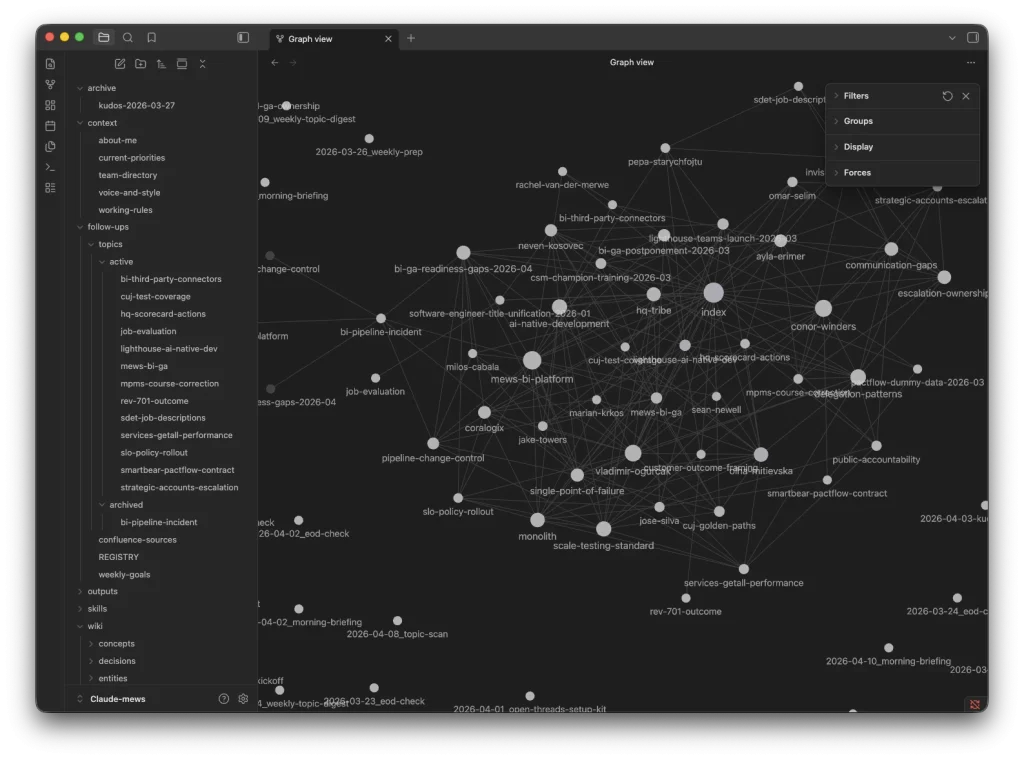
I browse everything through Obsidian, which treats the folder as a vault and renders the cross-references between files as a navigable graph. More on that below.
The architecture: two layers of markdown
The system has two layers, both just .md files in a single folder.
Layer 1: Open threads tracker. This is the operational layer — what’s happening right now. It has three components:
A registry (REGISTRY.md) — a single table of every active topic I’m tracking, with status, priority, owner, last activity date, and next action. Mine currently has 13 rows. It looks something like this:
| ID | Topic | Status | Priority | Next Action | Due |
|----|-------|--------|----------|-------------|-----|
| T-004 | Product X GA Launch | 🔴 Critical | #1 | Confirm no open P0s from sync | Apr 15 |
| T-011 | Escalation Ownership | 🔴 Needs Attention | #2 | Communicate decision to team | This week |
| T-013 | Goal Rework | 🟡 In Progress | #3 | Capture 1:1 outcome | Overdue |
Each topic has its own journal file in topics/active/. These are the workhorses. A journal file has a meta section (key people, relevant Slack channels, Confluence pages to watch), a current state summary, next actions, open questions, a decision log, and then timestamped journal entries — newest first. Here’s a simplified snippet:
# Product X GA Launch

## Meta
- **Status:** 🔴 Critical
- **Slack Channels:** #product-x-launch, #engineering-coordination
- **Confluence Pages:** Launch Readiness, Sunset Plan

## Current StateLaunch date postponed by two weeks. Pipeline stability improvingbut not yet confirmed. Support readiness gaps remain.

## Journal

### 2026-04-10 (daily scan)
**Source:** Slack (#engineering-coordination)
Team lead positive on FE changes. New data quality gapsurfaced — roadmap item not yet shipped. Launch channelsilent for 5 days (flag: need status update).

### 2026-04-08 (daily scan)
**Source:** Confluence (team check-in notes)Training model agreed for post-launch support.Side panel design to be completed today.
The third component is a confluence sources file that lists all the recurring meeting pages to monitor — staff meetings, 1:1s, team check-ins — with the last scanned page ID so the system knows what’s new.
Layer 2: Knowledge wiki. This is the durable layer — what you’ve learned over time. Four subdirectories:
wiki/entities/ — profiles of people, teams, and systems. An entity page for a direct report accumulates their current workload, development areas, feedback themes, and key decisions they’ve been involved in. For a system, it captures architecture, known issues, and dependencies. These pages get updated by every daily scan that touches the entity, so they stay current without me doing anything.
wiki/concepts/ — recurring patterns I’ve noticed across multiple topics. A concept page might be titled “Invisible Agreements” and describe the pattern where decisions get made in 1:1s but never written down, so they drift. Each concept page links to the specific topics that illustrate it. I have 11 of these now — after a month. Some are uncomfortable to read. That’s sort of the point.
wiki/decisions/ — major calls with context, alternatives considered, and rationale. Because Slack threads have a half-life of about 48 hours and Confluence pages are where context goes to die.
wiki/syntheses/ — cross-cutting analyses that span multiple topics. Risk assessments, readiness evaluations, pattern observations.
If this resonated with you, you’ll probably like working here.
Check out open positions at Mews.
Every wiki page links to related pages and to the topic journals that contributed to it. When I archive a completed topic, its durable knowledge graduates to the wiki — the entity pages, concept pages, and decision records all get updated. The topic journal stays in topics/archived/ as raw source material, but the useful knowledge lives on in the wiki where it compounds.
The scheduled scan: where laziness meets automation
The daily scan is where this stops being “a guy with some markdown files” and becomes a system that maintains itself. Every morning, a scheduled Cowork task:
- Reads the registry to know what topics exist
- Scans Slack channels listed in each topic’s meta section for new activity
- Checks Confluence parent pages for new meeting notes (comparing child page IDs against last-scanned values)
- Checks my calendar for upcoming meetings relevant to tracked topics
- Adds timestamped journal entries to any topic that had new activity
- Flags @mentions I haven’t responded to (the shame-driven-development feature — if someone pinged me 48 hours ago and I haven’t even dropped an emoji, it shows up in a “Pending Mentions” table)
- Flags topics that have gone stale for 7+ days: “follow up, pause, or archive?”
- Runs a wiki ripple — checks if the new activity changes anything on entity pages, concept pages, or decision records, and updates them
I wake up, open Obsidian, and the system has already told me what moved, what stalled, and what I’m ignoring. I didn’t have to do anything except, you know, not cancel the scheduled task. Even I can manage that. Most days.
What changed
Three things shifted for me.
First, the “Monday morning dread” is gone. I used to spend the first hour of the week trying to reconstruct where everything stood. Now I get a briefing that tells me which threads progressed, which stalled, and what’s overdue. I start making decisions instead of gathering context.
Second, I stopped dropping threads. Not because I became more disciplined — I didn’t, let’s be clear — but because the system is more disciplined than I am. It notices when a topic goes quiet. It notices when someone is waiting on me. It notices when a meeting outcome wasn’t captured. My manager once told me I need to “close loops visibly.” I couldn’t fix that about myself, so I built something that nags me about it instead. Cheaper than therapy, similar effect.
Third, pattern recognition across threads. When you have structured journals for a dozen parallel initiatives, you start noticing things you’d miss if each thread lived only in your head — the same person showing up as a bottleneck across three unrelated topics, or a process gap that caused an incident six weeks ago quietly reappearing in a different context. The system connects dots that I wouldn’t have the bandwidth to connect manually. It also occasionally connects dots I’d rather not see, like the concept page that’s got automatically titled “Michael doesn’t communicate decisions after making them.” Self-awareness delivered as a markdown file. Delightful.
The honest part
I’d love to end this with “and now everything is under control.” It isn’t.
The irony of building an AI-powered context management system is that it enables you to track more things, which means you end up tracking more things. My registry has 23 active topics right now. Three months ago, before this system existed, I probably would have been aware of six of them at any given time and the other seven would have been in various states of neglect. Now I’m aware of all 23, which is better, but it also means my cognitive load hasn’t actually decreased — it’s been redirected from “trying to remember” to “deciding what to act on.”
Context switching is still the hardest part of my job. AI doesn’t eliminate it. What it does is make the switches cheaper. I can put down a thread on Friday and pick it up on Monday without losing the plot. I can walk into a 1:1 with accumulated context instead of a blank slate. I can notice patterns across a dozen conversations that I wouldn’t have connected on my own.
This system is one tool in my toolset. It’s probably the most effective one I’ve built for managing the specific challenge of engineering leadership at scale — the sheer volume of threads, people, decisions, and follow-ups that need to stay alive in parallel. But it doesn’t solve the fundamental problem, which is that modern leadership means running more things in parallel than any human brain was designed for.
AI just means the ceiling is higher. Whether that’s a feature or a bug depends on the week.
Want to try it?
I’ve published the full setup as a single markdown file you can drop into your Cowork workspace: Claude Cowork Open Threads + Wiki Seed File .
It’s a bootstrap prompt — not a template you fill in manually. You drop the file into your Cowork folder, tell Claude “read this file and build this system for me,” and it walks you through a calibration: your role, communication style, which tools you have connected (Slack, Jira, Confluence, Linear, Notion, whatever — it adapts), and what you’re currently tracking. Then it builds the entire folder structure, all the templates, the skill file that teaches Claude how to operate the system, and the scheduled tasks. The whole setup takes about ten minutes.
A few caveats. This is a system that works for me and my particular flavour of engineering leadership chaos. Your version will look different — different tools, different patterns, different concept pages that make you uncomfortable. The calibration step exists precisely for that reason. Also, this is not a product. It’s a folder of markdown files and a prompt. It will occasionally do something unexpected. That’s fine. It’s still better than my brain at 6pm on a Thursday.