

At Mews, most of our Web UI is built with React, styled-components, and love. While shipping these UIs, we’ve built a robust component library and application architecture that can be adapted to scale well as Mews continues to grow. Scaling a large application like the frontend of our PMS shares a lot of similarities with scaling any kind of software, but as with any meaningful Product Engineering discussion – the key question is what you are scaling. Are you rendering millions of elements at 60fps? Are you pulling in a myriad of APIs to create a useful table dashboard with a few key insights? Are you trying to onboard 100 new engineers this quarter to a messy codebase?
We’ll discuss two axes for scaling; delivery and performance. With an emphasis on delivery.
Delivery

Scaling Delivery is Scaling People
In my opinion, this is the more important axis to focus on. We want to ensure teams can ship independently, that we’re building out separate modules, and that it is easy to add to the growing ecosystem of products and capabilities we deliver to everyone who derives values from our software. The pillars of scaling React’s productivity are centered around libraries, tooling, and architecture.
Libraries & Dev Tooling
Using the best tools has a dramatic impact on how ‘nice’ it feels to author and extend software. Most engineers know this intuitively and can tell when something is ‘off’, as opposed to when a codebase is smooth like butter. It’s the feeling of writing css manually, and then getting a component library to ‘click’ for them. Or that feeling of adopting tanstack-query & tanstack-router then deleting most of your code. Like when you grok TypeScript, and understand the utility it provides to enforce contracts and do wide-sweeping refactors in either a large monolith or monorepo codebase with confidence, especially when combined with “TypeScript Native” libraries like fp-ts, Effect, zod, and more.
Stepping more into the build and monorepo side, if you’ve ever made the jump from an old, unoptimized webpack build system to vite you know how massive an uplift that can be (or a nightmare). Picking solid foundations in this space like vite, rspack, nx, yarn, pnpm, and others will stabilize and calm life – or cause many long troubleshooting sessions. My advice here is to pick something a strong cohort are familiar with, something like 3 people who really know their way around a webpack config (or vite, or nx or… insert whatever) can really help power an organization through any tough spots when configuring packages, builds, and deploys. Sticking to LTS releases of Node, not worrying too much about adopting the latest fad, and choosing fast, battle-tested ‘golden paths’ will help avoid building too much yourself, while keeping iterations tight. Don’t underestimate the power of community (both internally and externally).
What you use to craft the code also comes into play, whether you use neovim (I use neovim btw), VSCode, WebStorm, Zed, or anything in between – you’re going to want a few key Extensions depending on what libraries and tools you’ve chosen. Things like Pretty TypeScript Errors to make reading those compiler errors a little less daunting. We could do a whole blog post on just VSCode extensions to be fair, with extensions like ErrorLens, ESLint, GitLens, and Prettier. When combined well, this class of tools removes cognitive overhead when authoring code. Prettier combined with ESlint (and TypeScript lints) is probably the best example as proper linting eliminates a whole class of bike shedding in code review.
Things don’t slow down at runtime either, pulling in the React Dev Tools gives great insights into what is happening in your app when all the components are put together. But even sticking with the browser’s built in performance analysis tools are helpful for debugging and troubleshooting where things are slow and why.
Having a standard set of tools empowers your organization’s engineers to focus on their domain, their products, and the value their software provides to the humans that use it. The toolbox is the starting point, and you can start off empty, or start in a well stocked shop.
Internally Developed Tools & Libraries
Inevitably, you or your platform tribe build something your product teams rely on for delivery. This could be pipelines, codemods, a component library – anything. The most important thing to help keep internal packages healthy is to foster non-blocking, async feedback loops to allow teams to unblock themselves, contribute to the package, while retaining high quality. This is no easy task, as there are competing priorities from project delivery to complex requirements in the shared space. Allowing temporary overrides with explicit commitments allows teams to unblock and then merge back into the pack while sharing the value of their workaround into a proper fix. As an example, take a component library that has a critical Modal component the entire company uses. One team may find it has a bug or undesired behavior for a multi step wizard form. Ideally, they can override or fork the library, fix the bug, and ship while opening a PR with their fix into the main library. This then starts an async, nonblocking feedback session on why the fix. Whether the fix is reverted and the original workflow is amended to be better (often the case), or whether the fix is improved to land in main (thus removing the temporary override), the most important aspect of either scenario is that is is non blocking. In order for this to work, both the product and platform teams have to take seriously these temporary overrides as being temporary.
Architecture
It’s not enough to npm install ... all the things and you’re all set – you need to draw boundaries. If you are more than one team, and you do want to onboard >10, >50, >100 engineers to your codebase, structures need to be put into place to prevent organizational spaghetti to erupt in the code a la “Mythical Man Month” style.
I don’t think there is a “one architecture to rule them all”, but I do see some common patterns emerging from the large React codebases that I’ll offer some high level advice on in a few key areas.
- Routing
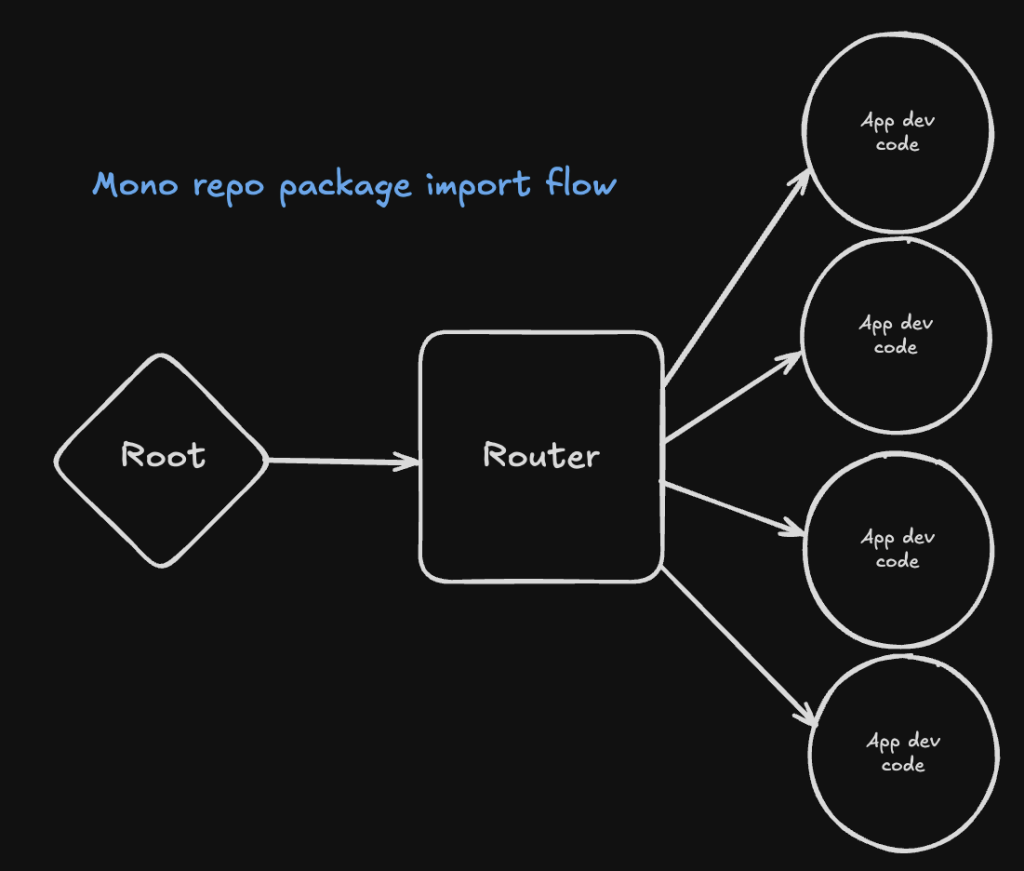
Enforce a common way to route, with centralized control as much as possible. This allows you to leverage the best of the routing libraries and tools you have. If you need to draw a boundary that cuts across routing, the tradeoff is a loss of type safety and less integration for Links, search params, and more from your routing library. Have you routes import decomposed packages, and ship your routes as one chunk or in code split sections, pulling in the decomposed packages as federated remotes or code split chunks.
- Data Loading
Bind data loading to your routing – leveraging pre-fetching, data loaders, and parallel loading at suspense boundaries can centralize & simplify loading and error states, eliminating boilerplate code. Create patterns teams can use to retain strong type safety for use cases outside the router loading.
- Styling
Whatever styling solution you have, build it around design tokens. The leverage you get from having tokens will enable cross-platform consistency and eases design and development.
Strongly prefer and advocate for “sketch development” alongside designers with your component library. First MVPs should have 0 custom styling outside of rare cases with a mature component library (even the ‘base’ needs are as simple as a Container, Flex, and Grid component). The pace of iteration you can get by building figma mocks in parallel to “sketch MVPs” is unparalleled. Show the customer these sketches week 1 of development over the figmas.
Then teams can iterate with their designers and developers can build up any component they need as a conscious trade off of custom styling development time – alongside non-blocking async contribution & feedback loops to “lay more bricks” down on the golden path as more common designs and patterns emerge.
- Testing
Leverage testing. Leverage testing. Leverage testing! If you don’t advocate and demonstrate this, it will fade away. Doing testing poorly will result in bugs, outages, long cycle times, slow pipelines, and a flaky mess that no one likes.
Keep the “Testing Triangle” in mind, and ensure tests execute within a reasonable time frame and that pipelines can detect what tests need to be run. The more you decompose and federate, the more precise, useful, and effective your lean test suites can be.
As you lift things up, a small suite of e2e tests should be leveraged, and building out a suite of prioritized e2e tests will help ensure quality and confidence across your product offerings.
- Lifting & Sharing
As your organization grow, teams will inevitably sketch out the domain of your product or products. Have paths of contribution to create shared packages, and have open conversations about when to slice or merge domains, teams, and packages as the shape of your domain emerges.

Would you like to support our frontend developers in achieving seamless React scaling?
Check out our open positions!
The general trend as teams get critical projects, is for them to silo and work independently without sharing or lifting up – potentially even within their own tribes and teams. It’s important for Staff and Senior Engineers to have check ins with teams to review their work and offer advice on how to simplify any duplicated efforts by lifting things up internally or publishing shared packages.
In a monorepo, these packages help keep track of complex relationships inter-domain. By default, circular imports are an error which is usually a good thing, as there is usually some context, data, or capability that needs to be lifted and shared.
In React, Context can be leveraged as a sort of DI via the use of hooks, promoting explicit dependencies while retaining high velocity & throughput.
Performance

Scaling Performance is Scaling the User Experience
Most performance slow downs that happen in a modern react app are due to unnecessary re-renders and poor data architecture (often inter-related!), so let’s dive into how to address these common performance bottlenecks.
Re Renders
An unnecessary re-render can happen if something tracked changes that has no meaningful output to customers; forcing React to ‘over-react’ to the dependency, re-rendering the component. The two broad strategies to address this are to hoist and memoize. When hoisting things, you’re collating work that needs to happen before rendering. It often involves breaking out your UI into presentational, or pure, components that have a lot less going on, and relying on fast computed state rather than trying to capture everything in a useState or useEffect. It’s far easier for React to optimize rendering these pure components. Beyond that, memoizing and even batching any state changes (useReducer anyone?) helps React schedule the updates to the vdom and subsequent reconciliation phase in an optimal way. Memoization can be overdone, as unless there is a re-render problem, the memory overhead of memoizing everything isn’t worth the trouble. But in cases of dynamic callbacks, it often needs to be done. It’s such a common pattern that memoizing callbacks has a dedicated utility hook in React – useCallback to ensure we have a stable reference to our callbacks so unless the actual definition of our callback changes, the UI can remain unchanged. (See the React Compiler for a way to automatically memoize!)
There’s more to this, but for now I’ll refer you to some “required reading” on removing unnecessary useEffects which is a highly impactful lever to pull when optimizing a React codebase:
- The react docs on use effect useEffect – React
- The react docs on when not to use useEffect You Might Not Need an Effect – React
- Use callback refs to avoid useEffect Avoiding useEffect with callback refs
- More from TKDodo on simplifying useEffect Simplifying useEffect
Avoid useEffect. Make renders fast. Use plain functions and derived state. Use your libraries well. Use the platform (like the URL for state). Measure & iterate.
Data Architecture
Very related to the architecture section in the Delivery section, a data architecture is the plan for how to load data. If you don’t give some thought to this, in the worst case you won’t use any Suspense boundaries and have useEffect’s fetching data anywhere and everywhere, potentially in response to user events, which is bound to create race conditions, intermediate states, and a bad user experience.
Leveraging Suspense, and tools like tanstack-query & a router with loaders, you can compose data loading so every page of your app loads quickly with fresh data ready for customers. Whether you prefetch, implement a standard interface to adhere to, or just use loader data – stopping to think about how data flows in your React App upfront can save a lot of pain later.
The best thing you can do is use suspense aware hooks and sensible Suspense boundaries so as much useful interaction can be rendered to the customer as fast as possible, while your app parallelizes data loading.
The FLOPS
Modern CPUs are fast. Like, really fast. And an app like Mews’ PMS is runs on commercial hardware like laptops, desktops, and smart phones. Even on a couple generations old hardware, like an old Dell or an old android device, you’ll still get decent performance without sacrificing much expressivity in the context of a web app like our PMS when using JavaScript and React.
Browsers themselves are also quite fast. A lot of work goes into making the JS interpreters that power the rich user interfaces we all use everyday. In fact, the chromium team even looks at new hardware like Apple silicon, ensuring websites get the best performance out of their visitors’ hardware.
In addition to a solid bedrock of chip performance and browser engine optimizations, for React applications, a lot of performance headroom was gained when React adopted green threads via Fibers in React 18. For a technical breakdown of this, check out this video from Lin Clark that discusses React Fiber what it does, and what it is.
All in all, the last thing we usually look for in React apps is raw performance, because for business applications that just fetch data and display it, we’re not doing many calculations. That being said, there are several tools and techniques to squeeze more performance out of React’s performance or to approach Web UI in a different way:
- Benchmarking & Profiling
- React Compiler
- React 19
- Million Lint
- React Scan
- Virtualization (render 10 million or infinite lists by rendering a sliding window)
- Calling out to canvas (link is just an example, many ways to do this)
- Calling out to WASM (there be serialization dragons)
- Calling out to bespoke / best in class tools like ffmpeg.
And of course, you could always find ways to ship less JavaScript with progressive enhancement, keeping in mind the performance cost of heavy assets. Keep your customers in focus to guide these decisions, for example at mews most folks who use our flagship PMS are on a windows desktop machine at work, in a hotel with network infrastructure to send wired or wireless internet to all of their guests. That doesn’t mean there aren’t cases where bandwidth may be constrained, but as a business we have to make balanced, informed tradeoffs; as does yours.
React & Teams
React (particularly jsx, vdom, and hooks) has proven itself to be an excellent abstraction over the DOM that unlocks composability, portability, encapsulation, and developer velocity without sacrificing too much speed. Scaling these apps are mostly limited by drawing boundaries and managing data and state properly. Just like all business applications, React web apps are no different – engineers are tasked with adding features, and then must analyze and iterate to ensure a stable, reliable, and performant experience is delivered to the customer for each subsequent cycle.
The work never ends, and the web makes it a lively experience! A unique blend of cutting edge tools from CSS, JS, WebGPU, with the stability of old browser quirks and a “never break the web” mantra. As a result we get a stable (albeit quirky) platform with a rich set of expressive power.
Happy coding!