
What if product documentation wasn’t about keeping users engaged, but rather about helping them disengage?
At Mews, we believe great documentation is not only about providing answers but also about doing so quickly and effectively, allowing users to get back to what truly matters to them: delivering outstanding hospitality.
The Mews Technical Writing team is wired to focus on single-outcome-based article structures and clear, concise, and accessible content. This ensures finding information is effortless, efficient, and intuitive to both humans and AI search engines. We create documentation that frees users from their screens so they can focus on their guests, not their search bar.
In this post, I’ll share how the Mews Technical Writing team structures articles for user disengagement and provide seven tips for writing with this approach in mind.
Structuring articles for disengagement
Readers rely on scanning patterns when navigating help articles, so structuring information effectively ensures they can find what they need without reading the entire document.
When answering “How” questions, we follow these guidelines:
- Use bulleted lists when order or sequence is not important. Examples: Checklists, parts lists, product features.
- Use numbered lists when order or sequence is important. Example: User manual Instructions.
- Limit lists to a maximum of seven to nine items to maintain user interest. Learn more here.
Single-outcome-based structure and purity of purpose
We design every piece of documentation with a single outcome in mind: helping the user complete a task with minimal friction. Instead of lengthy explanations or unnecessary context, we provide clear, concise, and actionable content.
Our writing follows the “purity of purpose” principle of modern product documentation. Overloading documents with multiple purposes can confuse users at best and deter them from their primary goal at worst.
Identifying the one true purpose of your document means identifying the user’s real-world need.
Once defined, your goal is to maintain it throughout the document, which is what is meant by retaining the “purity of purpose”.
An ideal article consists of the following elements:
- An introductory paragraph: Answer as many of the seven questions as possible: who, why, when, where, what, and what’s weird and wonderful about your information.
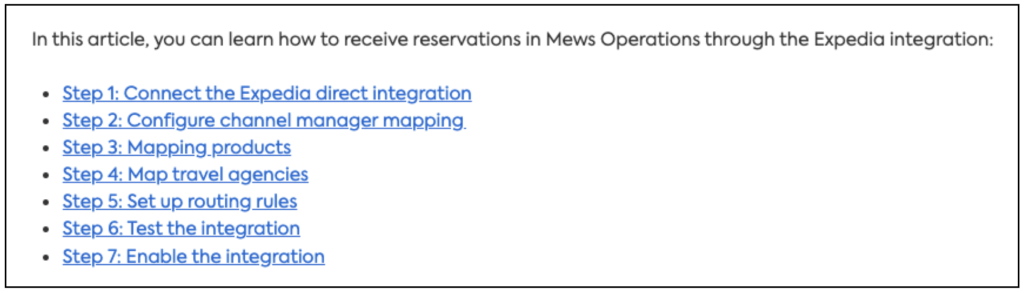
- A navigational element after the introductory paragraph. Example: “In this article you can learn about:” followed by a bulleted and indented list of topic headers with links to relevant sections.
- A real-world outcome as a conclusion. Example: If the help article is: “Creating a reservation in Mews”, the real-world result is: “You can now see the reservation in X, and manage it in Y. “
The focus is on direct problem-solving: helping users find what they need, apply it immediately, and move on.
Building on real-world use cases
Documentation should never feel theoretical. To be truly useful, it must reflect real-world scenarios that align with our users’ actual needs and workflows. By prioritizing practical applications over abstract explanations, we ensure our documentation is intuitive, relevant, and actionable.
This user-first approach bridges the gap between what the product offers and what users need.
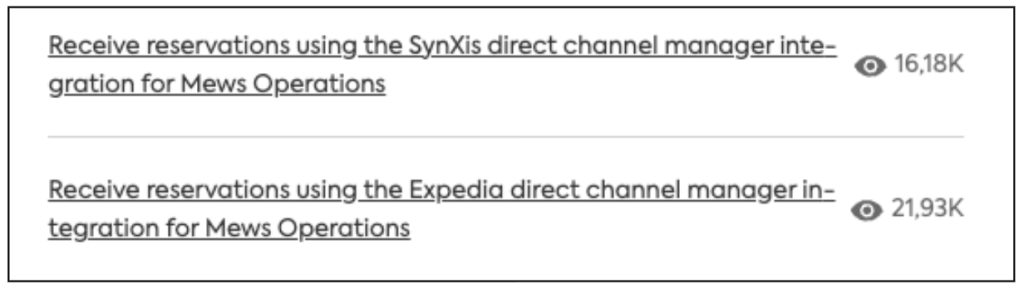
For example, Mews help articles on channel manager integrations focus on the real-world purpose of setting up integrations (receiving reservations) rather than just the setup process itself.
Seven tips on writing for user disengagement
- Speak your user’s language, not technical jargon
Users don’t care about internal product terminology or technical buzzwords. Don’t use jargon words or acronyms that can overwhelm and frustrate users. Instead, use sensitive and inclusive language that speaks to them directly.
- Apply the WYSIWYG principle
“What You See Is What You Get”: this principle extends beyond software design and into our documentation. Users should see instructions that reflect the actual product experience. This means:
- Screenshots that match the live interface
- Clear and consistent terminology
- Step-by-step guidance that aligns with the user’s journey
When documentation mirrors reality, users can navigate tasks with confidence and ease.
- Respect the user’s time
Users want quick answers so they can get back to work. We respect their time by:
- Structuring content for easy navigation
- Using relevant headings and bulleted lists
- Providing quick setup guides, FAQs, and trouble-shooting articles
We make sure the content is accessible, digestible, and instantly useful.

- Write, not Rewrite: The Plug and Play principle
At Mews, Write, Not Rewrite means we don’t spend time rewriting the same content. Instead, we write once and reuse strategically.
This approach ensures consistency and standardization across our documentation. Rather than reinventing instructions for every help article, we create modular, reusable content that can be plugged into multiple places.
This ties directly into our Plug and Play principle: we’re creating “plugs” of documentation that can be “played” (reused) wherever needed. Whether it’s setup instructions, feature descriptions, or troubleshooting steps, our documentation remains uniform and scalable across all touchpoints.
- Make documentation accessible
People who identify as neurodivergent are the strongest drivers of accessible web design. At Mews, we’re improving our Help page to better support users with cognitive disabilities like autism, dyslexia, and ADHD. Our goal is to accommodate diverse ways of navigating our help database.
We comply with the Change checklist (available for download at the end of the article) for producing accessible documentation:
- Clarity of language: Information and instructions in short, easy-to-read sentences.
- Structural organization: Bullet points and sub-headings break down the text into more digestible sections.
- HTML heading navigation: Text is navigable using HTML headings.
- Language simplicity: No difficult-to-understand words, jargon, abbreviations, or symbols.
- Visual elements: Screenshots of sufficient size and quality.
- Image placement: Strategically positioned images to correspond with relevant textual content.
- Consistency with text: Screenshots accurately reflect the information conveyed in the text.
Accessible design improves the experience for both neurodiverse and neurotypical users.
- Oversimplification is patronization
Clarity is key, but we never talk down to our users. While we avoid unnecessary complexity, we also ensure our documentation is informative and complete.
❌ Don’t write: “This is very easy to do! Just click the button.”
✅ Do write: “To complete this task, click the ‘Save’ button.”
Users appreciate straightforward explanations that respect their intelligence.
- Make it AI accessible
As AI-driven support becomes the norm, documentation must be structured for AI to easily find, interpret, and deliver answers. Long, unstructured content confuses AI, making help less effective.
Well-optimized documentation means instant answers, fewer support requests, and a smoother user experience. Help isn’t just available, it’s effortless.

Do you want to create products that Radhika can write about?
Check out our open positions!
Our AI chatbot: The Mews Digital Assistant
At Mews our goal is to disengage users not just from the Mews Help page, but from searching for help altogether.
The Mews Digital Assistant delivers help directly within the platform, so users can access relevant guidance without leaving their workflow. By plugging in ready-to-use help content into the assistant, we make sure users:
- Receive in-app, contextual support
- Find answers instantly without navigating to external pages
- Get assistance exactly when and where they need it
The next step in our disengagement strategy is helping users get what they need, when they need it, without shifting their focus.
Conclusion
At Mews, user disengagement isn’t a challenge, it’s the goal. Through structured, reusable documentation, user-friendly language, and intelligent in-app assistance, we ensure our users spend less time searching for help and more time delivering exceptional guest experiences.
By writing with purpose, prioritizing efficiency, and leveraging smart reuse, we create documentation that serves users, not the other way around. And when users need help, the Mews Digital Assistant ensures it’s always within reach, without breaking their flow.
Because Mews users spend less time on documentation, they spend more time on hospitality. And that’s what truly matters in their real world!